Why Your CMS Should Handle Analytics, Not Another Plugin
Most CMS platforms leave analytics to third-party plugins. CuberIQ takes a different approach: built-in GA, GTM, and pixel management with AI-powered diagnostics. Here's why analytics belongs in your CMS.
The Plugin Problem
Most CMS platforms treat analytics as an afterthought, delegating it to third-party plugins, external scripts, or entirely separate tools. This creates a fragmented workflow where content teams publish in one system, analyze in another, and try to correlate insights manually. The disconnect introduces real problems: tracking codes get misconfigured during site updates, pixel events fire inconsistently across page templates, and the feedback loop between content performance and editorial decisions is measured in days rather than minutes. Teams end up maintaining a brittle stack of plugins, tag managers, and dashboard tools that nobody fully understands and everyone is afraid to touch.
CuberIQ takes the position that analytics is a core CMS capability, not an integration concern. When the system that manages your content also manages your analytics instrumentation, several hard problems become trivial. Tracking codes are injected server-side as part of the content delivery pipeline, eliminating client-side race conditions and ad-blocker interference. Page-level and component-level performance data flows directly into the content model, making it queryable alongside editorial metadata. Content teams see performance metrics in the same interface where they create and manage content, closing the feedback loop from days to seconds.
Pixel Management and Diagnostics
CuberIQ provides first-class support for Google Analytics 4, Google Tag Manager, Meta Pixel, and custom tracking endpoints. Configuration is centralized in the platform dashboard rather than scattered across template code. When you add a GA4 measurement ID, CuberIQ handles script injection, event binding, and consent-aware loading automatically. The platform validates your configuration against the provider's API to catch issues like expired measurement IDs, misconfigured conversion events, or data stream mismatches before they cause gaps in your reporting. For teams managing multiple properties across brands or regions, CuberIQ supports per-site and per-locale tracking configurations with inheritance and override capabilities.
The AI-powered diagnostics layer continuously monitors your analytics health. It detects anomalies like sudden drops in event volume that might indicate a broken tracking implementation, identifies pages where expected events are not firing, and flags discrepancies between CuberIQ's server-side delivery metrics and client-side analytics data. When an issue is detected, the system generates a diagnostic report explaining the probable cause and suggesting a remediation path. This proactive monitoring replaces the reactive approach most teams rely on, where tracking issues are only discovered weeks later when someone notices a gap in a quarterly report.
A/B Testing and Content Performance
Because CuberIQ controls both the content delivery and the analytics pipeline, A/B testing becomes a native platform capability rather than a complex integration. Content teams can create variants of any content piece, define audience allocation rules, and monitor statistical significance directly in the editor interface. The platform handles variant assignment consistently across sessions, ensures clean data separation between test groups, and automatically pauses underperforming variants when results reach significance. Test results feed back into the AI Content Engine's understanding of what resonates with your audience, improving future content generation quality.
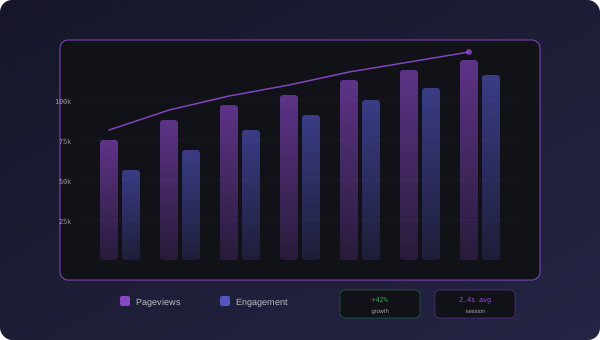
The content performance dashboard aggregates data from all connected analytics sources into a unified view designed for editorial teams, not data analysts. Instead of raw metrics, it surfaces actionable insights: which topics are trending upward, which content pieces are candidates for refresh based on declining engagement, and how content performance correlates with publishing time, format, and audience segment. Every metric links back to the specific content piece in the CMS, so teams can act on insights immediately rather than context-switching between tools. The dashboard is fully customizable, and all data is accessible via API for teams that want to build their own reporting workflows or feed performance data into external business intelligence tools.
CuberIQ Team
CuberIQ Team