The Complete Guide to Migrating from WordPress to a Headless CMS
A practical, step-by-step guide for teams considering a migration from WordPress to a headless architecture. Covers content modeling, data migration, frontend rebuilds, SEO preservation, and common pitfalls to avoid.
When Is the Right Time to Migrate?
The decision to migrate from WordPress to a headless CMS is rarely driven by a single factor. Common triggers include performance degradation as content volume grows, security concerns from maintaining a PHP runtime and plugin ecosystem, difficulty scaling for traffic spikes, and the need to deliver content across multiple channels beyond the website. Teams also migrate when they hit the limits of WordPress's monolithic architecture: when the frontend team wants to use a modern framework like Next.js or Nuxt but is constrained by WordPress's theme system, or when the content model needs to support structured, reusable content blocks that WordPress's post-and-page paradigm handles awkwardly. If your team is spending more time maintaining WordPress than creating content, migration is worth serious evaluation.
Before committing to migration, conduct an honest assessment of your current WordPress setup. Document every plugin in use and what business function it serves. Identify custom functionality built into your theme or through custom plugins. Catalog your content types, taxonomies, and relationships. Map your integrations with external systems like email marketing platforms, CRMs, and analytics tools. This audit serves two purposes: it defines the scope of the migration project and it often reveals technical debt and unused complexity that does not need to be carried forward to the new platform.
Content Modeling for Headless
The most impactful decision in a headless migration is content modeling. WordPress conflates content with presentation: a blog post is a blob of HTML that mixes structural content with layout directives. Headless CMS platforms separate content from presentation, which means you need to decompose your WordPress content into structured, channel-agnostic models. A blog post becomes a content type with discrete fields for title, author, body sections, featured image, SEO metadata, and related content references. This structured approach enables the same content to render as a web page, a mobile app screen, an email newsletter block, or an API response without transformation.
Resist the temptation to replicate your WordPress structure in the new CMS. Migration is an opportunity to rationalize your content architecture. Audit which post types and taxonomies are actually used, consolidate overlapping structures, and design for your future content needs rather than your legacy constraints. CuberIQ's content modeling tools support rich field types, nested components, references between content types, and validation rules that enforce content quality at the authoring stage rather than relying on frontend code to handle malformed content.
Data Migration Strategy
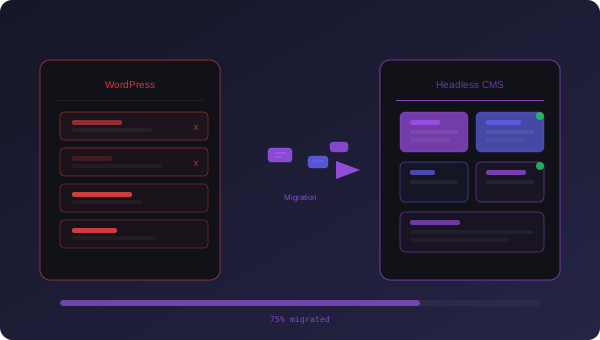
Data migration from WordPress follows a three-phase approach: extract, transform, load. The extraction phase pulls content from WordPress using the REST API or direct database export for large sites. We recommend the API approach because it respects WordPress's content processing pipeline, delivering rendered content rather than raw database values with shortcodes and serialized metadata. The transformation phase maps WordPress content to your new content model, parsing HTML body content into structured blocks, resolving media references, and normalizing taxonomy relationships. The load phase imports the transformed content into CuberIQ via the management API, preserving creation dates, author attributions, and content relationships.
Media migration deserves special attention. WordPress stores media in a date-based directory structure with multiple generated sizes per image. Your migration script needs to download original assets, upload them to CuberIQ's asset management system, and update all content references to point to the new URLs. Run the migration in stages: migrate a representative subset first, validate thoroughly, then run the full migration. Always maintain the WordPress instance in read-only mode during final migration to prevent content drift between systems.
Frontend Rebuild and SEO Preservation
The frontend rebuild is where teams typically invest the most effort. With a headless CMS, you choose your own frontend framework. Next.js is the most common choice for content-heavy sites due to its hybrid rendering modes, built-in image optimization, and strong SEO capabilities. The frontend consumes content from CuberIQ's API and renders it using your design system. This is an opportunity to improve page performance dramatically: server-side rendering eliminates the content layout shift common in WordPress themes, static generation reduces server load for evergreen content, and modern image formats and lazy loading strategies are easier to implement in a purpose-built frontend than in a WordPress theme.
SEO preservation is the highest-risk aspect of any CMS migration. Search engines have indexed your existing URLs, and any disruption to URL structure, canonical tags, or structured data can cause ranking drops that take months to recover. Build a comprehensive redirect map from every WordPress URL to its equivalent on the new site. Preserve URL slugs wherever possible. Implement the same structured data markup (Article, BreadcrumbList, FAQ, etc.) that exists on the current site. Submit the new sitemap to Search Console immediately after launch and monitor the Index Coverage report daily for the first two weeks. CuberIQ generates sitemaps and structured data automatically from your content model, reducing the risk of SEO regression.
Common Pitfalls and Timeline Expectations
The most common migration pitfall is underestimating content complexity. Teams plan for posts and pages but overlook custom post types, Advanced Custom Fields configurations, WooCommerce products, Gravity Forms entries, and the dozens of other content structures that accumulate in a mature WordPress installation. The second pitfall is attempting a big-bang migration. Plan for a parallel running period where both systems operate simultaneously, with gradual traffic shifting that allows you to catch issues before they affect your entire audience. A typical WordPress-to-headless migration for a mid-size content site takes 8 to 14 weeks from content audit to full cutover, with the content modeling and migration phases consuming the most calendar time. Invest the time upfront to get the content model right; refactoring a content model after migration is significantly more expensive than getting it right the first time.
CuberIQ Team
CuberIQ Team